
Facebook’s Terms of Use stipulate you can only have ONE account and it must be in your own REAL name. Not your business name, a fake name, pen name, etc. Nor can you have duplicate accounts.
However, good news! Facebook does provide a place for you to represent your business, and that is Facebook Pages.
Here’s the #1 reason to have your own Facebook Page (as well as your own Profile):
More people can find out about your business because your Page gets indexed and is searchable inside and outside of Facebook.
Other reasons include:
- Because the number of Fans you can have is unlimited (whereas the Friend limit is 5,000).
- Activity on your Page helps increase what I call “viral visibility” on Facebook.
- You can establish your brand even further.
Watch this video introduction then read the instructions below to get going with your Facebook Page!
Is 5,000 Friends Enough?
I appreciate 5000 friends may seem like a huge number to some people – perhaps unwieldy and difficult to manage. However, if you’re in business for yourself – or you work for a company – fast forward a year or more from today. Can you see it’s perfectly feasible you’ll hit that ceiling of 5,000?
Of the 100 million active Facebook users today, only a very small percent are at or near the Friend limit. But I’m certain in the coming months and years, we’re going to see an awful lot more members bumping up against that ceiling.
I’m optimistic Facebook will take steps to accommodate the need for a higher ceiling (or none at all). Meantime, you should definitely set up your Facebook Page so you can begin to build out your Fans on your Page as well as your Friends on your Profile.
From Facebook:
Establish an interactive presence on Facebook.
Every Facebook Page is a unique experience where users can become more deeply connected with your business or brand. Users can express their support by adding themselves as a fan, writing on your Wall, uploading photos, and joining other fans in discussion groups. You can send updates to your fans regularly — or just with special news or offers. Add applications to your Page and engage your users with videos, reviews, flash content, and more. Creating a Facebook Page is easy, free, and great for all types of businesses.
How To Create Your Facebook Page
To create your Page scroll to the foot of any Facebook web page and click on Advertising, then click the button to Create Facebook Page.

[Pages are totally FREE but for some reason Facebook has them under Advertising. I met Carolyn Abram recently at Blog World Expo; she works for Facebook on the User Experience Team and she co-authored the book, Facebook for Dummies. I asked Carolyn why Facebook have all but hidden where and how to set up Facebook Pages - she told me she wasn't sure either but that Facebook is aware of this. Hmm.]
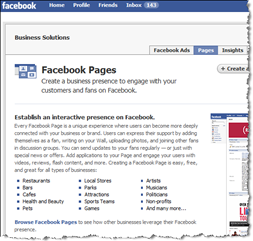
Unlike with Profiles, Facebook allows you to create multiple Pages – ideal for various ventures, products, brands or divisions of your business. And, keep in mind every Facebook Page will go to work for you in terms of SEO! (Search engine optimization.)
NOTE: Carefully choose the title of your page, ideally including your key words or phrases for SEO purposes. Your title is the ONLY feature you cannot change (just like Groups and Events).
Add Applications
Just as you can add apps to your Profile, you can add many of the apps to your Page. Recommended apps inculde:
- Static FBML (Facebook Markup Language) – allows you to include any of your own HTML.
- Flash Player – upload your own Flash files for advanced customization.
- YouTube Box – import videos you’ve already loaded to YouTube.
- Kyte – create your own TV channel.
- Simply RSS – import your various feeds. (See also Notes below).
Facebook default apps;
- Notes – import your primary blog post. If you write multiple blogs and are a more advanced techie type, use Yahoo Pipes to create a blended feed to import. Here’s how.
- Photos – load and tag pics. (Note – you can’t pull pics over from your personal P
rofile. You have to upload pics from afresh as Facebook doesn’t make the connection that your Profile and your Page are the same person!) - Videos -load your videos on Facebook even if they’re also on YouTube, Viddler, etc. for added exposure.
- Posted Items – share links with useful resources for your fans.
Ten Ideas To Create Buzz With Your Page
- Get a new domain.
Create a shortened redirect URL or buy a domain (e.g. janedoefanclub.com) and forward it to your Facebook Page URL. Mine is marismith.com/fanpage (also /funpage & /fanclub).
- Use Twitter. Tweet about your Page URL regularly. [Related posts: How To Increase Interaction With Your Facebook and Twitter Network | Twitter Buzz! Quick Tips for Business Peeps]
- Create exclusive content.
Add content to your Page for your Fans that they cannot get anywhere else, e.g. videos, tips, special gifts.
- Hold drawings.
Run a weekly prize drawing where you draw a Fan’s name at random for a prize.
- Play hide ‘n’ seek.
“Hide” something on your Page and get your Fans to find it. Have them tweet their answer to you! The first x get a prize.
- Run contests.
Create a photo and/or video contest. Have your Fans upload their photos/videos to your Fan Page.
- Provide a place for interaction.
Start a thread on your Discussion Board that allows your fans to promote and/or network with one another. e.g. See my thread: What’s your Twitter username? Share here and we’ll all follow!
- Acknowledge fans.
When new Fans write on your Page Wall, respond by writing back on their wall.
- Invite via siggy files.
Call your Fan Page a Fan Club and include an invitation to join your Club on your email signature file.
- Buy Social Ads.
Promote your Page with Social Ads. Every time someone becomes your Fan their name and photo may appear alongside your ad.

![]()
IMPORTANT: Make sure YOU become a Fan of your own Page(s)!!
Example Facebook Pages
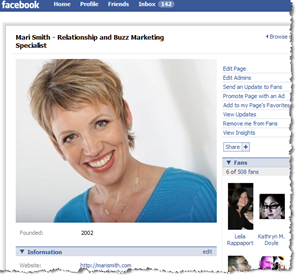
Mari Smith – Relationship and Buzz Marketing Specialist - The Blog Squad
- Social Network Fundraising
- Red
- Fast Company
- Forrester Research
- View all pages here. Browse the different categories and get a feel for what’s popular to include on your own Page.
Related Posts: On Facebook, Profiles are personal. PAGES are for Business | Invite friends to be fans Using share feature on pages
What’s your Facebook Fan Page? Feel free to post the URL below. And/or ask any questions or make suggestions here about Facebook Pages:
[UPDATE:] Note that Facebook are particular about how you promote your page and reference Facebook. There are several do’s and dont’s. See the promotion tips and how to create a Facebook Page Badge here.


Fantastic article, Mari. It seems like this question comes up all the time, what’s a fan page and you’ve done an outstanding job outlining how to build/use one. Thanks also for the link to The Blog Squad’s fan page. We send weekly (most weeks) updates to our fans, usually with links to important info and occassionally reminders about classes that are relevant to our subject…business blogging.
Would love to welcome new fans: http://www.theblogsquad.net/fanclub
Denise aka The Blog Squad’s last blog post.. Small Business Blog Panel at BlogWorld
Great tips Mari. I’ve only just created my page and it’s a little lonely at the moment so I’m finding your tips very timely
It’s at http://www.new.facebook.com/pages/United-Kingdom/Paradox-of-Reality-Peak-Performance-Therapy-Coaching/26088414703
Reeta’s last blog post.. The Credit Crunch, Worries and Your Well-being
It wasn’t on my list of action items today, but your post prompted me to start a contest on The Blog Squad’s fan page and push it out on Twitter and post on our blog. Thanks for the push to engage with our fans. Oh yeah, and I set up social ad to attract more fans! Been meaning to do that for awhile and again, you inspired me to action! Thanks and blog on!
Denise aka The Blog Squad’s last blog post.. Mari Smith Talks to The Blog Squad
Great Post. A facebook page is definitely a great way to promote your business.
One important thing however is that to attract fans to your page who otherwise might not know of its existence. You mentioned social ads – this is definitely a great way. Another method is to promote your page on other applications by using an ad network such as AdParlor.
I created a page myself and have used their network to bring in hundreds of new fans. This will really only work however if your page has more of a universal appeal. A business that provides ‘Free Online Movies’ for example would bring many people in – but if you are promoting your ‘mom & pop hardware store’ – no amount of advertising will bring these new fans in.
Great 101 guide, Mari – there’s a lot of good advice in here.
I’m always surprised with how many people, even those who generally know their way around social media – don’t know the difference between a Facebook “page” and a “profile.”
[...] How to Create and Promote your Facebook Fan Page by Mari Smith [...]
Great information Mari. I never knew that I could create a page, until I saw your tip on twitter. Was great help. I do need some tips to promote my page now. Thx for all the tips.
Cross Blog Networking – Shri’s last blog post.. ShriNagesh: @marismith you have every quality to be there on #1. congratulations once again
I think Facebook Pages are just on the verge of taking off. It is truly a must have.
Your post serves as a great primer to get started.
Thanks very much Mari!
Klaus Holzapfel’s last blog post.. New moviebakery video – Why I don’t have a piercing
I just wanted to re-emphasize the great job you did on the tutorial! Creating a fan page is so NOT obvious. Before sitting to listen on the tutorial, I toured Facebook just to test it out for myself and have a look. And you know what I got? Nothing. A big fat blank! So yeah, you rocked it!
Hi Mari, thanks for this, I’m still really new to the facebook pages concept. this article really helped!
you can find my page here: http://www.new.facebook.com/pages/Jennie-Rosenbaum/18394903886
Jennie Rosenbaum’s last blog post.. friday nude quotes
Thank you. This was a really helpful post and I did create two pages. However, I really don’t understand about creating a customized URL==specifically where I go to create it. I am guessing that you then use this URL to potential fans as a link to your page. I may have completely misunderstood but would love to find more information–I will buy the book! Thank for making me your fan!
opps–hi again I guess I needed to enter the page URL http://www.new.facebook.com/pages/Camp-Run-A-Pup/32747125193
[...] Build pages around each of your products or sites. This may give you some traffic Try this: Why Facebook? Social Networking for Fun and Profits! by Mari Smith Blog Archive How To Create and Pr… Might be helpful. Jason PS. I get enquiries via Facebook but I am in the service side of things [...]
[...] creating your own Facebook Page. First, a general overview is provided by social media guru Mari Smith. Once you get through that, you’ll be ready for Facebook’s own Help Center entry on [...]
[...] For detailed information on how to use Facebook as a part of your overall social networking program, check out Facebook expert Mari Smith’s post on How to Create and Promote Your Facebook Fan Page. [...]
Great post Mari, and thanks for the comment over at Training Marketer! You’ve got some really great advice here, I especially like the instructional video, well done. Depending on the nature of your business, Facebook can be a great tool to build your network and connect with customers. As the network continues to grow, more businesses need to get out there and get involved.
Marie’s last blog post.. How to use Facebook to promote your business
Very helpful advice! Thanks a lot.I’ll be doing a lot of this.
[...] The Deal With Facebook Pages? Last month, I came across a post from Mari Smith about best practices for initiating a Facebook page. Facebook pages were initiated to provide a [...]
Wow! I can see that I have a lot to learn from you, Ms. Smith. I feel like I’m just starting school again (and I’m a good student).
-Tina
These are some great ideas, and I like the way you’ve presented your thoughts on video. Much more fun than reading…
We, too, have used Facebook Fan Pages with success, a review of analytics shows Facebook Fan Pages are a good additional source for driving traffic to the sites.
Cheers, and keep up the good work.
I really enjoyed this post. I found it very helpful and I even started my first fan page.
I’m not sure if I did it right, but I was able to get over 600 fans within the first 4 days.
Thanks!
JR Rivera’s last blog post.. What is the Second key to a successful Short Sale?
_Great_ stuff, Mari. BTW, Twitter works. It’s how I ended up here. Thanks and looking forward to more I’ll retweet this.
Excellent information for new bloggers like me,
Hi Mari,
I’m curious whether you recommend “fan pages” over “groups” and why.
Otherwise, a very useful post!
Patrick’s last blog post.. Upcoming Green Business Events 2008
Thanks for the great post! As a new FB user, I’ve been trying to figure it out and this cleared up a lot of questions that I had!
[...] http://whyfacebook.com/2008/09/25/how-to-create-and-promote-your-facebook-fan-page/ Link to German interview. I have this as an mP3 to send you Link to Outsourcing team (photos of [...]
Hello Mari,
Your tips are great. I immediately started to build a facebook page for hr: Luxury Magazine
HP Jeschke’s last blog post.. The Shock Jock’s Gorgeous Hamptons Digs
Very useful guide, thanks Mari. I followed it to create a page for our business. Had a little trouble getting SimplyRSS to work, but figured it out in the end. I’ve also become a fan of your page.
Our new page is at http://www.facebook.com/pages/Beauty-Salon-Marketing-Salon-Marketing-Services/39990947657
Thanks again! Jon
Jon’s last blog post.. Internet Salon Marketing – 10 reasons to use Facebook
Thanks so much for all the helpful info to help demystify Facebook Pages. I’ve added some needed apps and now I just need some fans! Here’s my page:
http://tinyurl.com/6g4mhc
Stumbled on this article for information on tweaking the “fans page” and wasn’t aware of external apps that you could install! Great Resource…
Feel free to “Become a Fan” of Cyber-FM – http://www.facebook.com/pages/Cyber-FM/32598682245?ref=ts
Hi Mari!
Thanks a lot for the tips. Recently, a business owner asked me how to promote people to become his facebook fan. This really help.
However, if someone doesn’t have the money or don’t to spend a dime running contest and doesn’t have time to acknowledge his/her fan? Will facebook page work for this people?
Thanks.
Chetz Yusof
http://www.chetztv.com
- Doing It for Dogs -
Chetz Yusof’s last blog post.. Don’t Make The Same Mistakes
Mari,
I’ve been using FB for about 18 months now and still haven’t setup my FB page.
Thanks for the kick in the pants.
Alexander
Mari, great blog post and info – great video, so easy to assimilate more info!! Here’s my latest page, thanks to your gentle upbeat prodding! http://tinyurl.com/sherylbrownartpage Love to have new fans, thanks!
Sheryl Brown’s last blog post.. November Already! Art Parties and Surprise Drawings…
Great teaching, Mari – really appreciate it! Here’s my new effort http://www.tinyurl.com/sherylbrownartpage Love to have new fans!
Sheryl Brown’s last blog post.. "Dancing Mountains" follows "Peaks and Valleys" – one more show this year tomorrow!
Thanks so much for the great teaching, Mari – the video is a nice touch to reinforce easy learning! Here’s my latest effort – love to have fans!
Create a fan page has been on my to-do list for too long. Your post just bumped it up to a top priority.
You always share quality content.
Thank you!
Kim’s last blog post.. TweetLater – Follow the leader, but which leader .… or just simply lead?
Mari – I love your stuff! These are some great tips. I am currently writing some Facebook articles for my website, so I will be sure and give you a mention!
Amy Jewell’s last blog post.. Learn How to Massage – Video
[...] of excellent info. One post on creating a Fan page for your business I found particularly helpful: Why Facebook? Social Networking for Fun and Profits! by Mari Smith Blog Archive How To Create and Pr… Mari is a wonderful, smart lady and very approachable with something like this. Just a [...]
[...] can’t have a (personal) account in the name of a business. Fortunately you can set up Facebook Pages to represent your business on [...]
great article, found your site via twitter btw. glad i did!
Just made my 1st facebook page:
http://www.facebook.com/pages/Matt-Davis/51739007058
Hi,
are you able to tell me how to create a page like the RED campaign? where they have many images under their profile pic?
thanks mikey
Excellent article Mari. Some great insigt and really helpful.
James Tansell’s last blog post.. Christmas thoughts and wishes for everybody
Good post. Thanks for sharing. Interesting ideas on how to grow. I agree some people will never hit the 5,000 mark.. others are close.
Can you share what you know about how fans can tag themselves in photos I post (I’m a photographer) and how they can use my page URL to credit me for photos that they post in their profiles? What do you know about the fan photos application? I would like to invite clients to add their favorite photos that I’ve taken for them!
Sandi’s last blog post.. 2008 Newlyweds!
[...] your network, Facebook caps your friends at 5,000. (Which is why I strongly recommend setting up a Facebook Fan Page – where you can have unlimited fans). I reached the 5,000 friend limit after about 16 months of [...]
Hi Mari:
Love your site. Question about FacebookPages. Rather than using Facebook, I have a business account on FacebookPages. How do people find me? I would like to show my link code but can’t figure out how to find me on Pages without logging on. My name there is How To Start Your Own Business. Thank you for any help.
Kathi http://www.godseer.com
[...] many people know but you can set up a business profile on Facebook go to Mari Smith for a [...]
[...] How to Create and Promote Your Facebook Fan Page. See especially “10 ideas to create buzz with your Page.” Why Facebook, September 2008. [...]
Hi there, can you have a FB profile as well as a FB page?
Hi Mari: Found you through a mention as a great site by Buzz Marketing Daily. They were right. New to the whole social media space, but excited about its possibilities personally and professionally for my business, an eco-business calle Treemaxx. “Trees in the Forest” my blog about doing the environment’s business can be found at http://www.treemaxx.com/blog
Got you added through RSS. Thanks. Mike
Here is my fan page: http://www.facebook.com/pages/Chris-Record-Social-Networker-Direct-Sales-Coach-Real-Estate-Investor/56230623898
[...] Create a page about your product, brand, or service, since you’ll need somewhere to send users (check out the fan page for Left the Box). Once you have your page setup to how you like it, go back to the “Ads and Pages” section of Facebook. [...]
So glad I was turned on to you by Twitter! You rock!
http://www.new.facebook.com/advertising/#/pages/JenChicago/52085351968
Jen’s last blog post.. 3 sweet events going on this first week in February!
Thank you for the great articles, Mari. I recently created a fan page but I am looking forward to putting some of your tips into practice.
My fan page (of Hazelnut Kids Natural Toys) is http://www.new.facebook.com/pages/Traverse-City-MI/Hazelnut-Kids-Natural-Toys/35010211111
Mari – Excellent post! Loving it. By the way, what tool did you use to create the little video? Very nice.
Thanks.
Peter
[...] Mari details how to set up a fan page here: http://whyfacebook.com/2008/09/25/how-to-create-and-promote-your-facebook-fan-page/ [...]
Thanks for all your wonderfu e-mail tips and for explaining how to create the facebook badge! Can someone tell me how to connect it to my fan page (not personal). I’ve been searching for this info for two weeks – PLEASE HELP!!!!
Thanks,
Jane
OK. I built and published my page. Now, how do I get it into a tab or a link or any kind of display on my profile?
Mari
the link under “notes” isn’t working. Thought you’d want to know
Cheers – Jane
[...] Mari Smith. Mari has published an excellent article (in fact several articles) on her blog Why Facebook? She also has an excellent video tutorial on how to set up Facebook Fan Pages. After reading these [...]
Question:: If I upload a photo of a fan to my page… can I “tag” them? Or do they have to be my FRIEND?
Thanks!
Great insights! if I want to let fans post video, is there a limit to how many videos can be posted?
Hi, thank you for this useful post. I am a model and that is my business
So I created a Facebook fan Page to promote myself, but now I don’t know how to get people to find me on there. How do I create an URL that will take them to my page? People who were already my friends on my profile saw a link to my fan page and that’s how they found out about it. But if I want to tell people about it. What link should I give them? I tried that long URL at the top of the browser but it just takes you to the Facebook log on page. Please help!
The name on my fan page is “Nasim the Dream”.
Thank you in advance!
Facebook Pages in Advertising section? … hmmm? … because just maybe once all those pages get loaded up and actually generate traffic for their creators, then Facebook will have a great way to monetize by turning your Facebook Pages into a recurring fee charged to keep your page going? — I don’t know this, but if I were FB, this would be something to have thought about. What do you think Mari?