
Facebook’s New 2-Link Limit: 15 Smart Ways to Keep Driving Traffic
Facebook has been restricting the reach of posts containing links for years… maybe a decade+, right? Then, sometime in the last year, suddenly users started noticing that any links posted in the comments on other people’s posts were not active. Fair enough, this would cut down on spam links on your post comments, too. But this move was a sneak preview of what’s to come.
Now Facebook is reducing links in organic posts down to a measly two per month. Including posts where you share a link in the first comment. Wth?! Unless, that is, you splurge on a shiny new Meta One subscription. More on that below.
The thing is, based on Facebook’s Widely Viewed Content Report, the writing has been on the wall for eons: only a tiny fraction of link posts ever get much traction. Check out this chart:
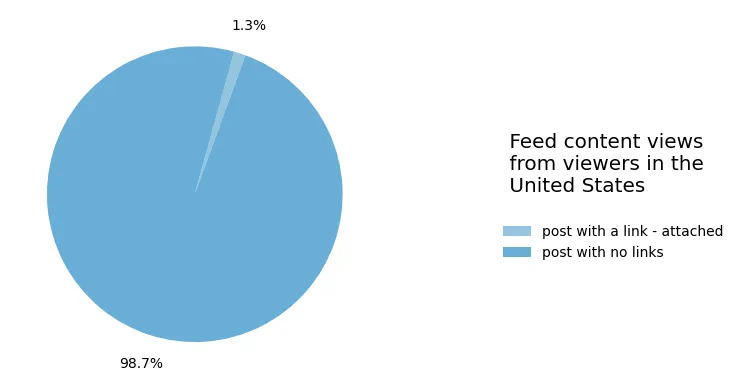
Only 1.3% of widely viewed content seen on Facebook feeds in the US in Q1 2026 contained an external link.
That stat is down from 9.8% in 2022 – a big drop!
So, again, link posts were already a weak channel.
BUT, we could say that this new 2-link-per-month organic cap encourages people toward DM-first, relationship-led conversational commerce.
Which is what Meta wants.
And that I’ve been teaching for years. More on that below in my 15 work arounds section…
Links in Facebook posts: clearing up the confusion
I recently shared a post on my Facebook Page about Meta’s big push for its new Meta One subscription plans. Which, eventually, will replace Meta Verified subscriptions… so it seems. For now, both are running alongside each other.
As part of the big Meta One subscription push, Facebook is starting to roll out the limitation of organic links in both posts and comments.
Typical Facebook/Meta, the announcement is clear as mud.
Everything is in flux and still being rolled out… likely for many months to come. So what you see/have access to will depend on your region.
Here’s what we know:
Facebook allows business Page Admins and personal profiles in ProMode to publish just TWO organic posts or comments with external links per month for free. (If you’re not seeing those limitations yet, count yourself lucky! But know that it’s coming over time, depending on your region.)
Links included in your organic posts AND in your comments count toward the monthly limit. But, the following types of links do not count toward the limit:
- Additional links in the comments of a post where you’ve already included a link
- Links to Meta technologies, including Facebook, Instagram, WhatsApp and Threads
- Links for affiliate partners connected through Facebook’s affiliate partnerships (look that up if you’re interested)
- Links in ads
Several members of my Social Scoop Facebook Group posted recently with screenshots and notifications about the link limitation. There’s significant discussion on this post. You’ll see in a comment on that post that a client of my social media colleague Phyllis is *not* happy with the new link limitations, declaring that Facebook is now dead to him. Oops!
I responded with some helpful input on creative ways to work around the link limitations, including driving more people into the DMs. Which is what Meta wants, ultimately. And why I put together this blog post to help you!
By the way, it used to be that a Meta Verified subscription lifted any link restrictions: you could post unlimited links with a plan in the early days. Meta has since stripped this… of course.
Even if you pay the $14.99 monthly subscription fee for the standard Meta Verified program, you are still restricted to just 2 links per month.
Meta One’s Expert tier at $149/month caps you at 20 Facebook link posts a month, and only the top tier allows you unlimited link posts on Facebook at $499.99/month. Learn more about Meta One plans.
15 Creative Ways To Work Around Facebook’s 2-Link Limit
1. Encourage people to DM you as your main CTA.
2. Reply to comments via DM as well as commenting publicly so others can see your initial response.
NOTE: Meta’s Messenger Platform policy allows a page to send just one private message in response to a public comment sent within 7 days of the original comment. Once the user replies to your private message, a 24-hour messaging window opens. During this time, you can continue chatting freely and send promotional content. This can be an effective way to start a 1:1 conversation… so long as the user replies. (If the user does not reply to your initial private message, you cannot send any follow-up messages.)
3. Set up one or more comment triggers in Meta Business Suite to auto DM. See instructions on how to set up Inbox Automations. This feature is free, unlike 3rd party chatbot tools, which of course you could try instead.
4. Test your Facebook Page’s main Action Button – does it go to the best place?
Encourage your audience to click this button as your regular CTA. However, keep in mind most people see one isolated post in their feed. They’re not viewing your post in context on your Page via mobile or desktop. So getting people to tap/click your Action Button takes a few more steps.
5. Strategically update your Page’s intro and profile links.
The website fields in your Page intro, and the links on your personal profile, are always on and aren’t posts. You get a decent number of characters on your business/public Page and can include a CTA and link. Try a paragraph block, or individual lines like I have on my Facebook Page. Even in the small field of your personal profile (with ProMode enabled), you can include a CTA and a link. See my Facebook personal profile as an example.
6. Create your own web page – similar to Linktree and other 3rd party tools used widely on Instagram). Include rotating/updated links and share your one web link when you’re able to.
7. Publish a post with your main link and pin that post to the Featured section.
Be strategic here because this will count as one of your two links. I don’t recommend just your ‘contact us’ page or main website. Rather, try a compelling lead magnet. Regularly encourage people to view that post.
8. Include links in Stories – hopefully Meta won’t tamper with this feature. Even so, I don’t know about you but I don’t get a lot of traction on links in Stories.
9. Update your cover photo, then click edit and add a CTA and link (in the caption and/or the comments). At the moment, it seems the link added after you upload/change your cover photo does not count towards the 2-link limit.
10. Use a spoken or on-screen memorable URL for livestreams, reels, and graphics.
11. Create Facebook Events where relevant – share that link (which doesn’t count in the 2-link limit).
12. Test including QR codes on some image posts (it is possible to read QR codes on mobile by saving or screenshotting the image).
13. Use text-to-join keywords if SMS marketing is part of your mix. E.g,. Text HUMAN to 555-XXX.
14. If a Facebook Group is part of your marketing mix to build community, sharing links in groups is not restricted (yet!).
15. RUN ADS! Okay, this one is obvious, right? Well, my very longtime industry friend Jon Loomer recommends just this. In fact, he’s encouraging remarketing at a very low daily budget. Jon states in his recent podcast:
“So target only Facebook and Instagram followers to promote an ad set of 50 links at something like $10 per day. It feels stupidly old school, and it’s something I’m mostly completely against. But even if you’re spending $150 or $300 per month on ads to do this, it’s likely more effective than paying $150 or even $500 per month to simply have the privilege of sharing links organically. Because those organic links aren’t guaranteed distribution.”
IMPORTANT!
- Plan your two monthly organic links – even if the 2-link cap hasn’t reached your Facebook Page yet, begin planning ahead now for when you do bump up against this ceiling.
- Treat these two links per month as a scarce resource.
- Keep a monthly link calendar.
- Remember that you can always encourage people to visit a website landing page that YOU control, especially if you’re also running Meta ads and you have the Pixel installed on your landing page for remarketing purposes.
- Save links for your highest-value offer, lead magnet, launch, event, fundraiser, etc.
What Links CAN You Post On Facebook?
Perhaps the good news here is that you can post as many links to Meta-owned destinations as you wish:
- Facebook, Instagram, WhatsApp, Threads
- WhatsApp click-to-chat links
- Links to your own Reels or posts on Instagram, Facebook or Threads
- Facebook Group links
- Facebook Event links
Note: For your personal profile, perhaps you’re brave enough to test disabling Professional Mode? Link restrictions only affect ProMode. If you’re already converted to ProMode and have a number of followers (which are merged with your actual friends now), then you might not want to tamper with that… At some point, depending on Facebook’s mood of the day (!), turning off ProMode could cause you to lose your followers.
Maybe this is Meta’s nudge to do what works anyway: fewer links, more real conversations. And that is certainly music to my ears… even though I completely empathize with businesses and non-profits of all sizes who are exceedingly upset about the new link limitations.
Move people to your email list
And finally, just a solid reminder that every business should continue to proactively build their email list. Email marketing is still very much alive and kicking. So, once someone is in your DMs, invite them onto your list. After that, you never need Facebook’s permission to send them a link!
Speaking of which, do you get my weekly email newsletter, The Social Scoop? If not, hop over here and join us! Each week, I write a simple message to help break down the most relevant Facebook, Instagram, social media, tech, and Meta AI topics pertaining to marketers. I don’t overwhelm you with a zillion details, UI changes, buttons and dials that you don’t really need to know. (You can get all that from other sources, if you wish. ha! ?)
My weekly email is a companion to my Facebook Group of the same name. We’d love to see you there, too!
Got questions or comments? I’d love to hear from you. You can DM me on my Facebook Page or Instagram.
Content Authenticity Statement: This blog was typed entirely manually by me, fingers on the keyboard. You’re welcome to read my company’s Generative AI Policy. As inspired by our friends at the Marketing AI Institute with their Creative Commons Responsible AI Manifesto for Marketing and Business.
