
How To Turn off Facebook Chat
It’s arrived: Facebook chat just blasted it’s way onto my computer screen with several nonsensical instant messages.
I knew this feature was being tested in certain Networks across Facebook and I wasn’t sure how I’d feel about it. My attention is already massively divided without having to deal with messages on the fly from people I’m not (yet) in relationship with!!! (Can you relate?! LOL)
A friend of mine recently asked how she could stop “weirdos” from IMing her. My first suggestion was to remove them as a friend. (Go to their Profile; scroll to the foot and click on the “Remove from Friends” link).
However, now that I have Facebook Chat, I see the easiest way to “turn it off” is to Go Offline.
How to: click on the little silhouette icon in the very bottom right of your browser. That pops up a little window as shown in the screenshot below. Then, just click Go Offline.
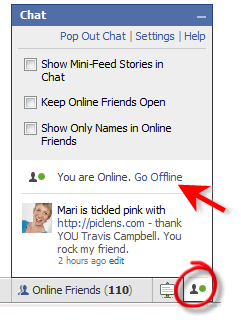
Per Facebook, you will now no longer be able to receive chat messages from your friends. Thus, this is a toggle–if and when you feel like making yourself available for instant chatting, just Go Online!

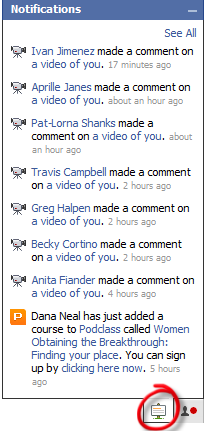
However, I will tell you ONE nifty feature about this new add-on I DO like!! And that is Notifications. Just click on the little message board icon (circled in the screenshot below), and you’ll see your most recent Notifications pop up. (You can also update your Status from this little popup – click on the little silhouette icon, then click edit. See screenshot above).
What are your thoughts? Do you like Facebook Chat? If so, how are you using it effectively for business networking?

Mari –
As usual, you’re a head of the curve on providing excellent, useful information for FB users. I agree, the best part is the notifications!
Thanks!
Maria 🙂
Hey Mari – I added your article to my post,
http://fundiva.wordpress.com/2008/04/23/donotwantfacebookchat/
(shouldn’t it have autopinged? maybe not on edit)
We must have written these at the same time, I got my facebook chat ambush minutes before I saw your #$%! tweet!
🙂 fdc
@Susan – you know, you bring up a good point!! I use Skype for chatting a lot and I’m pretty sure all the folks I IM w/ on Skype are also my FB friends. I’m experimenting with changing from Offline to Online for just a few minutes here and there to see what happens. heehee.
Hi Mari,
I like the idea of Facebook chat if it is used responsibly. It could be a very powerful and effective tool for marketing if not abused.
It makes Facebook a “one-stop shop” for communications if your actual friends and business associates (as opposed to your marketing “friends”)are all using Facebook. It keeps you from having to toggle between FB and Yahoo or Skype or whatever IM client you are using.
But I do appreciate your tip about how to turn it off. Though I have not had to use that yet, I, too,have been concerned that at some point there will be way too much spam or perverts or both.
Time will tell if it is a good thing or a bad thing. If we can police ourselves and follow the rules of FB etiquette, I think it will turn out to be an excellent addition to our social marketing arsenal.
Cheers,
Susan
Mari
Thanks for the tip about getting my notifications from the chat box – makes it very easy to find them
Patty
Mari,
I think Facebook chat is a great feature! It will be interesting to see how they evolve the feature over time.
You do bring up a great point though about tons of random IM’s from people you really don’t know yet…It will be interesting to see how people deal with this and if more people will always put themselves offline, compared to those who stay online.
Other than that…I have to agree with you as well about how the status update feature is awesome!
The last thing I need is more info and distractions popping up at me. I figured out how to turn the chat off the first day I noticed it on my profile.