
Facebook News Feed and Wall: How To Control Privacy
 A Facebook friend recently mentioned she was intentionally responding to new Facebook friend requests late at night as she didn’t want to clog up her friends’ feeds. Thing is, there’s a setting in your Facebook Privacy to control exactly what gets published on your Facebook Wall and your friends’ News Feeds.
I have my settings tweaked so that when I add a new friend this is not published on my Wall or friends’ News Feeds. One of the main reasons was, like my girlfriend, I didn’t want to clog up my friends’ feeds.
But, also, what I found was that some folks would watch my feed and see who I was becoming friends with, then reach out to them and infer we had a much deeper connection than was so. Such is the nature of Facebook friends — it could be someone brand new you’ve just added or someone you’ve known all your life.
In any case, there are a few settings you may not be aware of either when it comes to what content you choose to publish on your Wall and, by default, out into your friends’ News Feeds.
How to edit your News Feed and Wall settings:
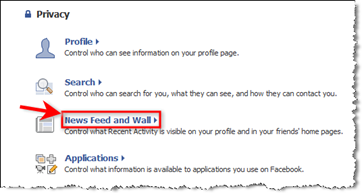
On the top blue navigation bar, mouseover Settings > then click on Privacy Settings > then click on News Feed and Wall as shown in the screenshot below:
On the next screen, check or uncheck the settings as you wish. The screenshot below is exactly how I have my settings:
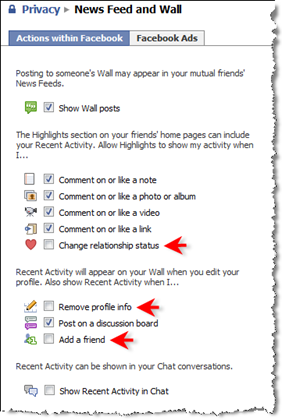
Add a friend
If you have the “Add a friend” setting checked on your News Feed and Wall privacy section, your Wall could look like this when you confirm friend requests en masse:
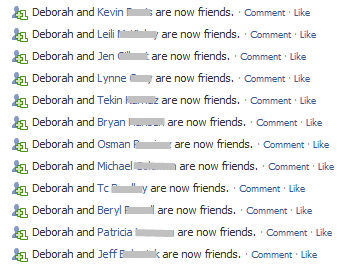
Plus, this activity may show up in all your friends’ News Feeds. There could be very strategic reasons to leave this setting checked as maybe you want people to see how many friends you’re adding, or who they are. But my preference is to have it private for reasons mentioned above.
I’ve been at the 5,000 Facebook friend limit since fall 2008 but I do monitor my News Feed very closely to ensure the people in my inner circle are a match for my style and vice versa. (By the way, if ever you remove a friend, no notifications go out at all. I know this is a concern for many folks!)
Show Wall posts or not?
If you also use Facebook for personal purposes and want to keep personal separate from business, you might want to give thought to this Wall setting. In other words, if you prefer to have the Wall posts you write only show up on that friend’s Wall and not be published out into the News Feed of all your friends, uncheck the top setting. (There is a much more granular way to control your Publisher settings which I’ll write about in a separate post).
I tend to be totally open and use Facebook for strategic professional networking 99% of the time. Every action creates visibility so I’m happy for all Wall posts to go into all friends’ feeds.
 One thing to consider though is when you’re wishing your friends a happy birthday. Whether it’s you or an assistant that writes birthday greetings, you might want to be aware that every Wall post may go out into your friends’ News Feed assuming the “Show Wall posts” setting is checked. If you have a lot of friends and all you write is “Happy Birthday” on your friends’ Walls one after the other, frankly, I think it looks automated and impersonal. Instead, I suggest mixing up the birthday greetings and perhaps even spacing them out a bit.
Change relationship status
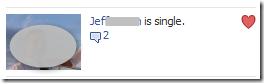
Again, it’s a personal choice. But, for me, I recently went through a personal transition as I wrote about here and I didn’t want to broadcast that news via Facebook. This setting may be irrelevant to most people – but it’s certainly one you should be aware of.
Here’s what your friends might see in their Highlights section on their Home Page, unless the setting is unchecked:
Let me know if you found this post useful and how you like to have your News Feed and Wall settings in the Comments section below. Have you taken advantage of the really granular publishing and privacy settings? What’s your biggest question(s) about these settings?

On my girlfriends fb profile I can see she has 117,but she just added someone n I can’t see it..why?